
Aaj ke modern iPhones (iPhone 13, 14, 15, aur 16 Pro series) me 4K 60fps Dolby Vision HDR, Cinematic Mode, aur ProRes Log video recording jaisi powerful cinematic capabilities aati hain. Lekin ek raw clip ko viral reel, professional YouTube video ya wedding teaser me badalne ke liye aapko yeh samajhna zaroori hai ki how to edit a video on iphone. Is practical guide me hum built-in Photos app ke hidden editing features se lekar best video editing apps aur industry-level best free video editing software tak sabhi techniques step-by-step cover karenge.
Quick Art Photography Academy ka flagship offline studio campus Ayodhya Puri, Near Lalit Bus Stand, Siwan, Bihar - 841226 me sthit hai, jahan outstation students ke liye 100% Free Room / Hostel stay suvidha uplabdh hai (food extra). Jo creators ghar baithe live practical editing seekhna chahte hain, unke liye Daily Live Batch shaam 07:30 PM se 09:00 PM IST conduct hota hai.
Method 1: How to Edit a Video on iPhone (Photos App Built-In Tools)
Agar aapko kisi third-party app ko download kiye bina jaldi se video trim ya color balance karna hai, to iOS ka native Photos app bohot capable hai. Yahan jaaniye how to edit iphone video built-in tools se:
Trimming & Cutting Unwanted Starts and Ends
Apne iPhone ke Photos app me video kholein aur top-right corner me Edit par tap karein. Niche timeline scrubber par yellow border dikhega. Dono taraf ke handles ko drag karke shot ka starting aur ending bekar hissa trim karein. Trim ke baad Done dabakar Save Video ya Save Video as New Clip select karein.
Cropping, Straightening & Aspect Ratio (9:16 vs 16:9)
Niche crop icon par tap karein. Top-right me aspect ratio icon choose karein:
- 9:16 Vertical: Instagram Reels, YouTube Shorts aur TikTok ke liye full-screen ratio.
- 16:9 Landscape: YouTube long-form video aur TV presentation ke liye.
- Straighten Wheel: Agar camera shoot karte waqt thoda tedha ho gaya ho, to slider ghuma kar horizon line 100% seedhi kar sakte hain.
Color Adjustment: Exposure, Highlights, Contrast & Warmth
Dial icon par tap karke iPhone video me manual color correction kar sakte hain:
- Exposure & Highlights: Agar aasman ya chehra zyada chamak raha ho, to Highlights ko -15 se -25 karke details wapas laayein.
- Shadows: Andhere hisson me chhipi details nikalne ke liye Shadows ko +10 se +20 badhayein.
- Warmth (Tint): Indian wedding lighting me warm gold tone dene ke liye Warmth ko halka sa boost karein.
Cinematic Mode Focus Pull & Depth-of-Field (f-stop)
Agar video iPhone ke Cinematic Mode me shoot hui hai, to edit screen par top-left me f icon dikhega. Is par tap karke aap recording ke baad bhi background blur (Aperture: f/1.4 se f/16) adjust kar sakte hain, aur screen par kisi doosre person par tap karke rack focus (focus pull) change kar sakte hain!
Slow-Motion Speed Ramping
120fps ya 240fps Slo-Mo video me timeline ke upar vertical bars dikhte hain. Jahan bars door-door hain wahan video slow hoti hai, aur jahan paas hain wahan normal speed hoti hai. In bars ko drag karke aap precise moment par dramatic slow-motion trigger kar sakte hain.
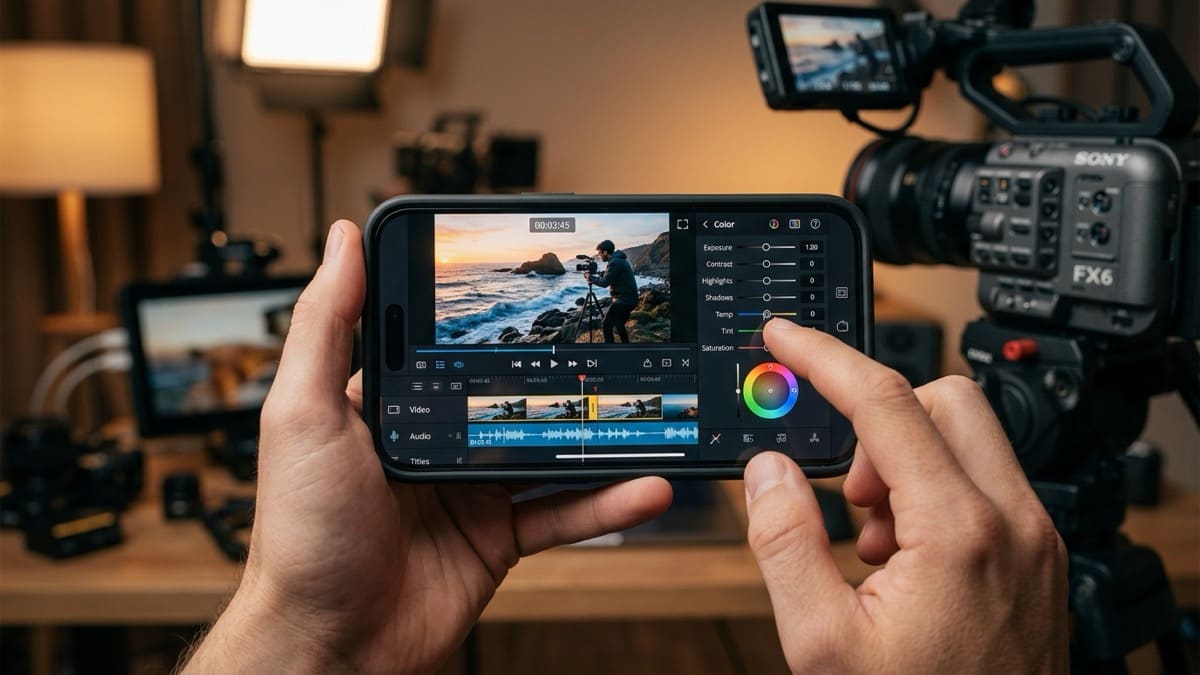
Modern mobile video editing workflow: Multi-track timeline, sound waveforms & real-time color adjustment on iPhone.
Top 5 Best Video Editing Apps for iPhone (Free & Freemium)
Jab aapko multi-track timeline, background music, sound effects, text animations aur speed ramping chahiye, tab aapko dedicated best video editing apps ki zaroorat hoti hai.
1. VN Video Editor (VlogNow)
VN Video Editor iPhone ke liye ab tak ka sabse behtareen aur clean editing app hai. Isme koi intrusive watermark nahi aata, aur yeh beginner se lekar advanced mobile editors ke liye perfect hai.
- Key Features: Multi-layer video and audio tracks, Speed Curve (Smooth slow-fast ramping), Keyframe animation, Chroma Key (Green Screen), aur custom Cube LUTs import karne ki suvidha.
- Best For: Cinematic Instagram Reels, travel vlogs aur client preview videos.
2. CapCut (By ByteDance)
Agar aap trending Instagram Reels aur YouTube Shorts banate hain, to CapCut sabse tez tool hai. Iske AI automated tools ghanton ka kaam minutes me kar dete hain.
- Key Features: 1-Click Auto Captions (Voice-to-Text), Auto-Beat Sync music cuts, trending optical flow slow motion, aur smart background cutout without green screen.
- Best For: Talking-head reels, podcast clips aur energetic social media edits.
3. DaVinci Resolve for iPad & iPhone
Blackmagic Design ne apne world-famous desktop software ko Apple Silicon chipsets ke liye optimize kiya hai. Yeh mobile device par true Hollywood studio power deta hai.
- Key Features: Cut Page timeline, Fairlight audio engine, 32-bit floating point color processing, aur Apple ProRes Log color grading.
- Best For: Serious filmmakers aur wedding cinematographers jo iPhone se ProRes Log shoot karte hain.
4. Apple iMovie
Apple ka official iMovie app 100% free hai, jisme zero ads aur zero subscription charges hain. Yeh bilkul clean aur safe environment deta hai.
- Key Features: Magic Movie feature, Hollywood style storyboards, 4K 60fps export, aur Mac par project transfer (AirDrop) karne ki suvidha.
- Best For: School/college projects aur quick family video compilation.
5. Blackmagic Camera App
Yeh technically ek camera app hai, lekin iPhone par cinematic footage shoot karne ke liye yeh video editing ka pehla aur sabse critical step hai.
- Key Features: Manual shutter speed (180-degree rule), manual ISO, white balance in Kelvin, False Color exposure monitor, aur direct external SSD recording.
- Best For: Clean, noise-free footage capture jo editing me kabhi break nahi hoti.
Best Free Video Editing Software for PC/Mac (When Mobile Isn't Enough)
Mobile apps reels ke liye shandar hain, lekin jab aapko 500GB ki wedding raw footage, 4-camera sync, aur high-budget client commercial edit karna ho, tab aapko best free video editing software ki taraf aage badhna hota hai:
DaVinci Resolve (The Undisputed King of Free Desktop Software)
Blackmagic ka DaVinci Resolve (Free Version) duniya ka sabse powerful free video editing software hai. Isme na to koi watermark hai, na hi koi time limit. Isme aap 4K UHD video edit kar sakte hain, advanced color grading wheels use kar sakte hain, aur 100+ audio tracks par professional mixing kar sakte hain.
CapCut Desktop & Shotcut
PC par quick social media content ke liye CapCut Desktop fast rendering deta hai, jabki Shotcut ek open-source, lightweight software hai jo kam budget wale laptops par bhi bina graphics card ke chal jata hai.
Step-by-Step Pro Workflow: How to Edit iPhone Video for High Engagement
Ek viral reel ya cinema-look video banane ke liye is 5-step production pipeline ko follow karein:
- Step 1 (Proper Camera Settings): iPhone camera settings me jakar Formats -> Most Compatible ya High Efficiency select karein. 4K 24fps cinema look ke liye aur 4K 60fps slow-motion ke liye set karein.
- Step 2 (Import & Rough Cut in VN): Sari clips ko VN app me layein. Pehle 3 second me sabse striking visual lagayein (Hook). Faltu pauses aur stumbles ko Q/W ripple trim se hata dein.
- Step 3 (Beat Matching & Audio Ducking): Music track import karein. Beat markers on karein taaki energetic beats par visual transitions match hon. Voiceover ke peeche music level -20dB par duck karein.
- Step 4 (Color Correction & Contrast): iPhone video me contrast +10, saturation +8 aur shadows +5 karein taaki footage flat na lage. Over-saturation se bachein taaki skin tone natural rahe.
- Step 5 (Instagram Safe Export): Resolution 1080p, Frame Rate 30fps ya 60fps, aur Bitrate 15 Mbps set karke export karein. Instagram app me Upload at Highest Quality setting hamesha ON rakhein.
Feature Comparison: Best Video Editing Apps for iPhone
| App Name | Price / Watermark | Multi-Track Audio | Speed Curve Ramping | Best Use Case |
|---|---|---|---|---|
| VN Video Editor | 100% Free / No Watermark | Yes (Multiple layers) | Yes (Custom Bézier) | Cinematic Reels & Vlogs |
| CapCut | Free (Optional Pro features) | Yes | Yes (Optical Flow) | Trending AI Reels & Captions |
| DaVinci Resolve | Free (Studio upgrade paid) | Yes (Fairlight Pro Engine) | Yes (Full Keyframing) | ProRes Log & Color Grading |
| Apple iMovie | 100% Free / Zero Ads | Limited (2 Audio tracks) | Basic Slider Only | Quick Simple Home Videos |
| Blackmagic Cam | 100% Free / No Ads | Pro VU Meters | Camera Tool (Recording) | Cinematic Manual Capture |
Frequently Asked Questions (FAQ)
iPhone me bina kisi app ke video edit kaise karein?
iPhone ke native Photos app me video open karke top-right corner me 'Edit' par tap karein. Yahan se aap video ko trim kar sakte hain, 9:16 vertical crop kar sakte hain, exposure/contrast adjust kar sakte hain, aur Cinematic Mode ka background blur change kar sakte hain.
iPhone ke liye best free video editing app kaunsi hai bina watermark ke?
VN Video Editor iPhone ke liye sabse best 100% free video editing app hai jisme koi watermark nahi aata. Isme multi-track timeline, speed curve, keyframe animation aur custom LUT import ki suvidha milti hai.
PC ke liye best free video editing software kaunsa hai?
PC aur Mac ke liye DaVinci Resolve duniya ka sabse powerful aur best free video editing software hai. Iske free version me bina kisi watermark ke 4K 60fps export, advanced Fairlight audio mixing aur Hollywood-standard color grading milti hai.
Kya iPhone se professional wedding teaser edit kiya ja sakta hai?
Short reels aur quick social media teasers ke liye iPhone aur VN/CapCut bahut acche hain. Lekin 2 se 3 ghante ki multi-camera full wedding documentary, 4K multi-cam audio sync aur heavy client projects ke liye PC/Mac par Adobe Premiere Pro ya DaVinci Resolve hi professional industry standard hai.
Quick Art Photography Academy me video editing kaise seekhein?
Quick Art Photography Academy me aap Siwan studio (Ayodhya Puri, Near Lalit Bus Stand, Siwan, Bihar - 841226) aakar offline practical lab me seekh sakte hain jahan outstation students ke liye 100% Free Room / Hostel stay uplabdh hai (food extra). Ya fir Daily Live Class shaam 07:30 PM se 09:00 PM IST online batch join kar sakte hain.